
This guide explains how to measure brand visibility in ChatGPT, including what each metric means, where the data comes from, and how to combine it into a monthly report.

More buyers now begin their research in ChatGPT. With search changing, marketing teams are being asked the question, ‘“Is our brand showing up in AI search, and is it bringing in business?”
That’s harder to answer than it is for traditional search. OpenAI’s Business Hub, Google Analytics, and manual search checks each show a different part of the picture. And their numbers rarely match. This guide explains how to measure brand visibility in ChatGPT, including what each metric means, where the data comes from, and how to combine it into a monthly report.
Affiliate disclosure: This article contains an affiliate link. WD Strategies may earn a commission if you purchase through it, at no additional cost to you.
Brand visibility in ChatGPT isn’t a single number. The term can describe several different outcomes. This can include your brand being named in an answer, your website being cited as a source, or a user clicking through to your site and taking an action there. These outcomes are related, but each one needs its own measurement.
The key metrics in AI search include:
AI visibility and AI traffic are not the same thing. Visibility describes whether and how your brand shows up in answers. It includes the context of each mention, the competitors that appear alongside you, and the sources ChatGPT draws on.
Traffic describes what happens next, which is whether people click through to your site and whether those visits turn into business.
A brand can be highly visible in ChatGPT and still receive little referral traffic, because many users get what they need from the answer itself. Measuring both, and keeping them separate, gives you a more accurate picture than either one alone.
Each metric answers a different question, so decide which question matters most to your business before you start pulling reports.
That question shapes the rest of the process. It determines which landing pages and key events you review in GA4, which buyer questions you test in ChatGPT, and which metrics belong in your monthly report.
Start with one or two questions and a report small enough to maintain each month. A focused report with clearly defined metrics is more useful than a dashboard full of numbers no one can explain.
OpenAI launched Business Hub in beta in November 2026. It’s the dashboard businesses use to manage how they appear in ChatGPT, and it includes a business profile, Insights, and Business Agents.
According to OpenAI’s setup guide, eligible businesses can claim a profile, but insights require an approved claim and identity verification. Eligibility varies by business type and location. You do not need to create a Business Agent or run ads merely to access available insights.
Once your claim is approved, open Insights and record each figure along with the date range shown.
OpenAI currently reports aggregate activity over a 7- or 28-day window, including mentions, website clicks, and discovery topics. If a figure is blank, record it as unavailable. The activity may be below OpenAI’s reporting threshold, still being collected, or unavailable for another reason.

The dashboard doesn’t keep data beyond that window and doesn’t offer an export, so save the numbers on a regular schedule, such as weekly, to build your own record over time. If a figure is blank, record it as unavailable. Activity may fall below OpenAI’s reporting threshold, which is more common for smaller businesses, or the data may still be collecting.
Pay attention to how OpenAI defines each metric.
Because of this definition, treat the mention count as a minimum rather than a total. Label it in your report as “ChatGPT website references” so it isn’t mistaken for every time ChatGPT recommended your brand.
Label each metric according to OpenAI’s definition rather than presenting mentions as a total of all brand recommendations.
If your business can’t access Business Hub yet, note that limitation and continue with the other data sources in this guide. Missing dashboard data doesn’t mean your brand never appears in ChatGPT.
Insights also doesn’t show individual prompts, competitor data, or conversion results. It tells you that ChatGPT referenced your website, but not why. The next steps help fill in those gaps.
Business Hub shows how often ChatGPT sends clicks to your site, and Google Analytics shows what those visitors do once they arrive.
How to Find ChatGPT Referrals in Google Analytics

For each reporting period, record the date range, the number of sessions, and the landing pages those sessions reached. Landing pages show which content ChatGPT is sending people to, and you can compare them with the discovery topics in Business Hub.
Next, review the key events your organization already tracks, such as form submissions, purchases, or calls, for the same traffic. This is where visibility connects to business results. Keep in mind what referral data can’t tell you.
A session attributed to ChatGPT confirms that a visit happened, but it doesn’t reveal every mention that came before it or prove that the conversation caused a later purchase. Some ChatGPT visits also appear as direct traffic, especially when people copy a link or use the mobile app. Consent settings, browser privacy features, and attribution settings all affect what GA4 records.
Keep Business Hub website clicks and GA4 sessions in separate rows of your report. They come from different systems and measure different events, since a recorded click in ChatGPT doesn’t always result in a tracked session. If the figures differ significantly, check the date ranges first. Business Hub covers the past 28 days, so set GA4 to the same window before you interpret the gap.
Choose questions your intended customers might ask while looking for the type of product or service you provide. Your existing customer inquiries, sales conversations, and website search data can help identify topics. Use actual team knowledge where available; avoid treating a made-up prompt as evidence of what customers are asking.
Keep each question’s wording and review conditions in your notes. Record the date, the platform and mode used, whether your brand appeared, and any sources the answer cited. If location matters to the service, record the location context too. A consistent log gives the team something to compare as information on the website changes.
Manual checks have limits. Answers may vary by user, session, wording, location, and time. A few prompts are a directional sample, not a measurement of every customer’s experience or the brand’s total share of recommendations. Do not paste private client or customer information into a prompt without authorization.
If your team is looking for a more consistent and in-depth view of a defined prompt set, Semrush offers an AI Visibility Toolkit. Its Semrush Prompt Tracking feature monitors selected prompts and can report brand mentions, cited sources, and competitor visibility across its supported platforms. Check the product’s current coverage and subscription requirements before relying on a specific feature.
Its Prompt Research tool can also help you find the questions your audience asks by topic, which is useful when building the question set in step 4. Because Semrush runs its own prompt checks, it doesn’t depend on Business Hub eligibility.
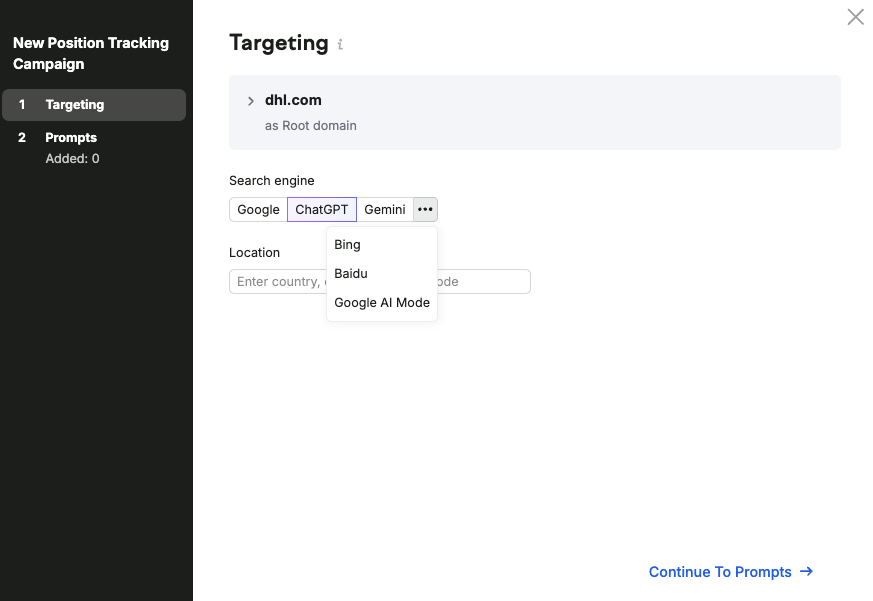
Keep its results labeled as independent monitoring. A tracked brand mention in Semrush and a Business Hub mention may use different definitions and cover different activity. Compare the trend and context of each source rather than adding the counts together.
Cited sources can also guide a content review. If a relevant industry directory or comparison page appears frequently in your results, examine what it says about your business and whether the information is accurate. A citation is a lead for investigation, not a guarantee that changing a page will produce a future mention.
Use a simple report with one row per source and the exact period covered. Include the Business Hub definition that applies to the business, relevant GA4 referral sessions and tracked key events, and the scope of your prompt sample. Record significant changes to the website or marketing campaigns that might affect interpretation.
For each finding, add an owner and next action. The action might be to correct an outdated service description, check why a landing page is difficult to navigate, or collect another month of data before making a decision. If the evidence is incomplete, say so.
Before assigning an action, identify what evidence would show whether the work helped. For a page update, that might be a future check of its content accuracy or the engagement data your analytics can reliably report. Keep the original observation and the date of the change so the next reviewer can follow the reasoning.
The goal is a record your team can use to make better decisions, not a single score that claims to capture every customer interaction. If you would like help setting up the reporting process, contact WD Strategies.
